
Hyundai Elantra: Lighting System / Hazard Lamp Switch Repair procedures
| Inspection |
| 1. |
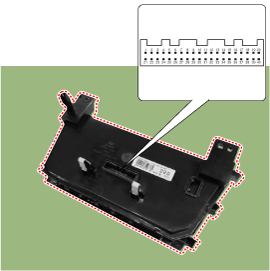
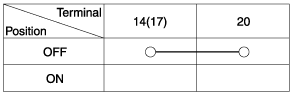
Check for continuity between terminals. If the continuity is not as specified, replace the hazard lamp switch.
Manual (Auto)
|
| Removal |
|

| 1. |
Disconnect the negative (-) battery terminal. |
| 2. |
Remove the glove box upper cover assembly.
(Refer to Body - "Glove Box Upper Cover Assembly") |
| 3. |
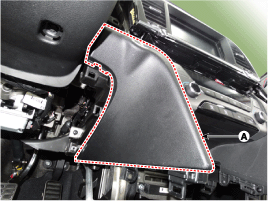
Loosen the mounting screws and remove the crash pad center lower cover [LH] (A).
|
| 4. |
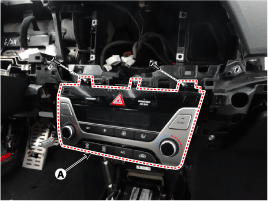
After loosening the mounting screws, remove the A/C & heater controller unit (A).
|
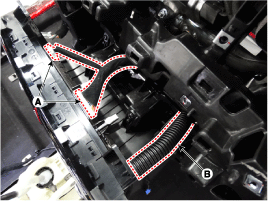
| 5. |
Disconnect the A/C & heater controller connectors (A) and hose (B).
|
| Installation |
| 1. |
Install the center facia panel switch assembly. |
| 2. |
Connect the negative (-) battery terminal. |
 Overhead Console Lamp Repair procedures
Inspection
1.
Remove the overhead console lamp assembly then check for
continuity between terminals. If the continuity is not as specified,
replace the map lamp switch.
Removal
1.
Disconn ...
 Rheostat Components and Components Location
Components
...
Other information:
Hyundai Elantra AD (2016-2020) Service Manual: Rear Door Module Repair procedures
Replacement
1.
Remove the rear door window glass.
(Refer to Rear Door - "Rear Door Window Glass")
2.
Remove the rear door outside handle.
(Refer to Rear Door - "Rear Door Outside Handle")
3.
Loosen the rear door latch mounting screws.
Tightening torque :
6.9 ~ 10.8 N.m (0.7 ~ 1.1 ...
Hyundai Elantra AD (2016-2020) Service Manual: Description and Operation
Description
BSD is a system that uses two magnetic wave radar sensors
attached on the rear panel to measure the distance from the following
vehicles and provides the sensing and (visual and auditory) alarm of any
vehicle coming into the blind spot.
-
Blind Spot Detection (BSD) : Senses o ...
