
Hyundai Elantra: AVN System / AVN Remote Controller Repair procedures
Hyundai Elantra AD (2016-2020) Service Manual / Body Electrical System / AVN System / AVN Remote Controller Repair procedures
| Inspection |
| 1. |
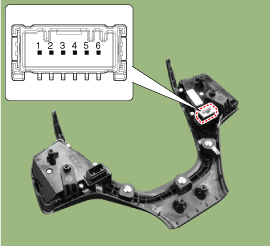
Check for resistance between terminals in each switch position (LH).
[LH : Audio + Hands free]
|
| 2. |
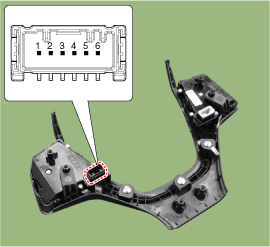
Check for resistance between terminals in each switch position (RH).
[RH : Trip + Cruise]
|
| Removal |
| 1. |
Disconnect the negative (-) battery terminal. |
| 2. |
Remove the steering wheel assembly.
(Refer to Steering System - "Steering Wheel") |
| 3. |
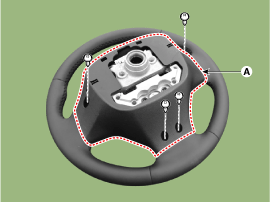
Remove the steering back cover (A).
|
| 4. |
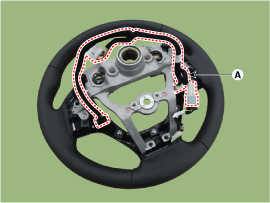
Remove the steering remote control connector (A).
|
| 5. |
Remove the steering remote control after loosening the screws.
|
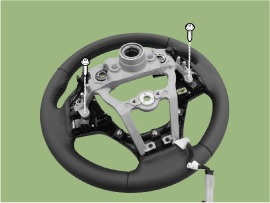
| Installation |
| 1. |
Install the steering wheel remote control after connecting the connector. |
| 2. |
Connect the negative (-) battery terminal. |
 AVN Remote Controller Schematic Diagrams
Circuit Diagram
[Audio + B/Tooth + Voice]
[Trip]
[Trip / Cruise]
[Trip / Cruise/ Smart Cruise] ...
 AVN Antenna Components and Components Location
Components
[SXM]
[SXM + GPS]
[SXM + GPS + LTE] ...
Other information:
Hyundai Elantra AD (2016-2020) Service Manual: Variable Intake Solenoid (VIS) Valve Specifications
Specification
ItemSpecificationCoil resistance (?)30.0 ~ 35.0 [20°C(68°F)]
...
Hyundai Elantra AD (2016-2020) Service Manual: Tires/Wheels
Tire Repair procedures
Tire Wear
1.
Measure the tread depth of the tires.
Tread depth [limit] : 1.6 mm (0.063 in)
2.
If the remaining tread depth (A) is less than the limit, replace the tire.
When the tread depth of the tires is less than 1.6 mm(0.063 in), the we ...
© 2018-2026 www.helantraad.com
