
Hyundai Elantra: Braking System / Parking Brake
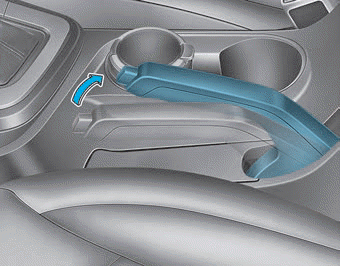
Always set the parking brake before leaving the vehicle. To apply the parking brake:
Firmly depress the brake pedal.
Pull up the parking brake lever as far as possible.
WARNING
To reduce the risk of SERIOUS INJURY or DEATH, do not operate the parking brake while the vehicle is moving except in an emergency situation. It could damage the brake system and lead to an accident.
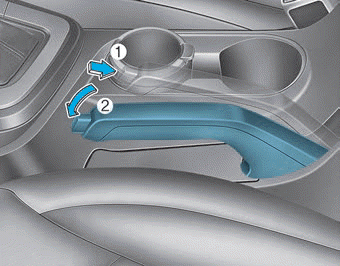
To release:
Firmly depress the brake pedal. While pressing the release button (1), slightly pull up on the parking brake lever then lower the parking brake lever (2).
If the parking brake does not release or does not release all the way, have your vehicle checked by an authorized HYUNDAI dealer.
WARNING
- Whenever leaving the vehicle or parking, always come to a complete stop and continue to depress the brake pedal. Move the shift lever into P (Park) position, then apply the parking brake, and place the ignition switch in the LOCK/ OFF position. Vehicles with the parking brake not fully engaged are at risk for moving inadvertently and causing injury to yourself or others.
- NEVER allow anyone who is unfamiliar with the vehicle to touch the parking brake. If the parking brake is released unintentionally, serious injury may occur.
- Only release the parking brake when you are seated inside the vehicle with your foot firmly on the brake pedal.
NOTICE
- Do not apply the accelerator pedal while the parking brake is engaged. If you depress the accelerator pedal with the parking brake engaged, warning will sound. Damage to the parking brake may occur.
- Driving with the parking brake on can overheat the braking system and cause premature wear or damage to brake parts. Make sure the parking brake is released and the Brake Warning Light is off before driving.
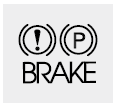
Check the Parking Brake Warning Light by placing the ignition switch to the ON position (do not start the engine).
This light will be illuminated when the parking brake is applied with the ignition switch in the START or ON position. Before driving, be sure the parking brake is released and the Brake Warning Light is OFF.
If the Parking Brake Warning Light remains on after the parking brake is released while engine is running, there may be a malfunction in the brake system. Immediate attention is necessary.
If at all possible, cease driving the vehicle immediately. If that is not possible, use extreme caution while operating the vehicle and only continue to drive the vehicle until you can reach a safe location.
 Disc Brakes Wear Indicator, Rear Drum Brakes
Disc Brakes Wear Indicator
When your brake pads are worn and new pads are required, you will hear a high
pitched warning sound from your front or rear brakes. You may hear this sound come
and go ...
 Anti-lock Brake System (ABS)
WARNING
An Anti-Lock Braking System (ABS) or an Electronic Stability Control (ESC)
system will not prevent accidents due to improper or dangerous driving maneuvers.
Even though vehicle control is ...
Other information:
Hyundai Elantra AD (2016-2020) Service Manual: Temperature Control Actuator Specifications
Specifications
Door PositionVoltage (V)Error DetectingMax. cooling0.3 ± 0.15 Low voltage : 0.1V or less High voltage : 4.9V or moreMax. heating4.7 ± 0.15
...
Hyundai Elantra AD (2016-2020) Owners Manual: Exterior Lights
Lighting control
To operate the lights, turn the knob at the end of the control lever to one of
the following positions:
1. OFF position
2. AUTO headlamp position (if equipped)
3. Parking lamp position
4. Headlamp position
Daytime running light (DRL)
The Daytime Running Lights (DRL) can m ...
