
Hyundai Elantra: Trip Computer / Conventional Cluster
The trip computer is a microcomputer- controlled driver information system that displays information related to driving.
Information
Some driving information stored in the trip computer (for example Average Vehicle Speed) resets if the battery is disconnected.
Trip modes
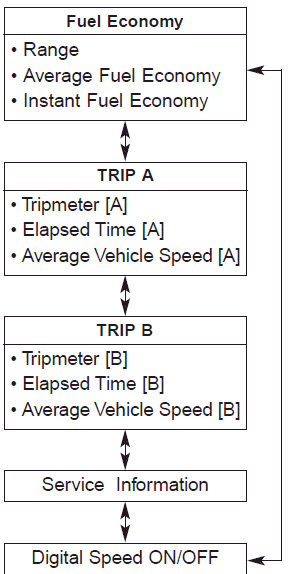
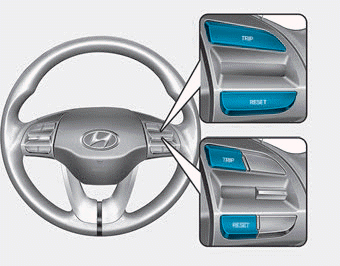
To change the trip mode, press the TRIP button on the steering wheel.
Range
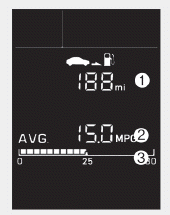
Range (1)
- The range is the estimated distance the vehicle can be driven with the remaining
fuel in the fuel tank.
- Distance range:
1 ~ 9999 mi. or 1 ~ 9999 km - If the estimated distance is below 1 mi. (1 km), the trip computer will display "----" as the range.
Information
- If the vehicle is not on level ground or the battery power has been interrupted, the range function may not operate correctly.
- The range may differ from the actual driving distance as it is an estimate of the available driving distance.
- The trip computer may not register additional fuel if less than 1 gallon (3 liters) of fuel are added to the vehicle.
- The fuel economy and range may vary significantly based on driving conditions, driving habits, and condition of the vehicle.
Average Fuel Economy (2)
- The average fuel economy is calculated by the total driving distance and
fuel consumption since the last average fuel economy reset.
- Fuel economy range: 0.0 ~ 99.9 MPG or L/100km or km/L - To clear the average fuel economy manually, press the RESET button on the steering wheel for more than 1 second when the average fuel economy is displayed.
Instant Fuel Economy (3)
This mode displays the instantaneous fuel economy while driving when the vehicle speed is greater than 6.2 mph (10 km/h).
- Fuel economy range: 0 ~ 50 MPG or 0 ~ 30 L/100km
Trip A/B
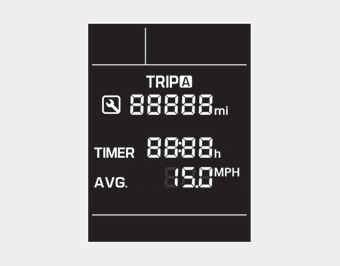
Tripmeter (1)
- The tripmeter is the total driving distance since the last tripmeter reset.
- Distance range: 0.0 ~ 9999.9 mi. or km - To reset the tripmeter, press the RESET button on the steering wheel for more than 1 second when the tripmeter is displayed.
Elapsed Time (2)
- The elapsed time is the total driving time since the last elapsed time reset.
- Time range (hh:mm): 00:00 ~ 99:59 - To reset the elapsed time, press the RESET button on the steering wheel for more than 1 second when the elapsed time is displayed.
Information
The elapsed time will continue to be counted while the engine is still running (for example, when the vehicle is in traffic or stopped at a stop light.)
Average Vehicle Speed (3)
- The average vehicle speed is calculated by the total driving distance and
driving time since the last average vehicle speed reset.
- Speed range: 0~160 MPH or 0~240 km/h - To reset the average vehicle speed, press the RESET button on the steering wheel for more than 1 second when the average vehicle speed is displayed.
Information
- The average vehicle speed is not displayed if the driving distance has been less than 0.19 miles (300 meters) since the ignition switch or the Engine Start/Stop button was turned to ON.
- The average vehicle speed will continue to be calculated and will start to decrease if the vehicle is stopped while the engine is still running (for example, when the vehicle is in traffic or stopped at a stop light.)
Service information
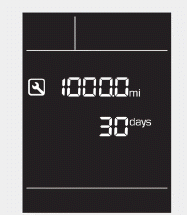
If the remaining mileage or time reaches 900 miles (1,500 km) or 30 days, the
service symbol ( ) will blink for several
seconds each time you set the ignition switch or Engine Start/Stop button to the
ON position.
) will blink for several
seconds each time you set the ignition switch or Engine Start/Stop button to the
ON position.
Information
To change or deactivate the service interval, consult an authorized HYUNDAI dealer.
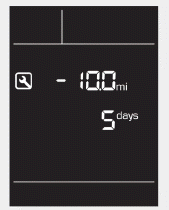
If you exceed the specified service interval, the service symbol ( )
will blink each time you turn ON the vehicle.
)
will blink each time you turn ON the vehicle.
To reset the service interval, press the RESET button for more than 5 seconds and then when the miles and days blink press the RESET button for more than 1 second.
If the service interval is not set, the service symbol ( )
will not be displayed.
)
will not be displayed.
Digital speedometer
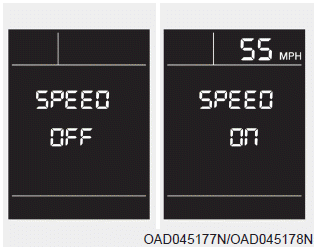
This message shows the speed of the vehicle (in mph).
To turn the digital speedometer ON and OFF press the RESET button for more than 1 second when the digital speedometer is displayed.
 Trip Computer
...
Other information:
Hyundai Elantra AD (2016-2020) Service Manual: Rear Wheel Speed Sensor Components and Components Location
Components
1. Front wheel speed sensor2. Front wheel speed sensor cable
...
Hyundai Elantra AD (2016-2020) Service Manual: Air Cleaner Components and Components Location
Components
1. Air cleaner cover2. Air cleaner element3. Air cleaner body4. Air duct5. Air intake hose6. Breather hose7. Resonator
...
