
Hyundai Elantra: Windshield Defrosting and Defogging / Auto Defogging System (Only for Automatic Climate Control System)
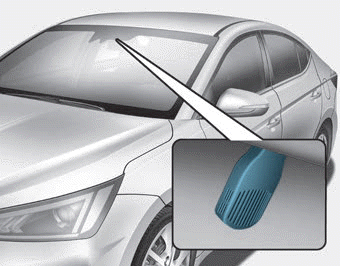
Auto defogging reduces the possibility of fogging up the inside of the windshield by automatically sensing the moisture of inside the windshield.
The auto defogging system operates when the heater or air conditioning is on.
Information
The auto defogging system may not operate normally, when the outside temperature is below 14 °F (-10 °C).

When the Auto Defogging System operates, the indicator will illuminate.
If higher level of moisture are sensed in the vehicle, the Auto Defogging System will operate in the following order:
Step 1) The A/C button will turn ON.
Step 2) The air intake control will change to Fresh mode.
Step 3) The mode will be changed to defrost to direct airflow to the windshield.
Step 4) The fan speed will be set to MAX.
If the air conditioning is off or recirculated air position is manually selected while Auto Defogging System is ON, the Auto Defogging System Indicator will blink 3 times to signal that the manual operation has been canceled.
To cancel or reset the Auto Defogging System
Press the front windshield defroster button for 3 seconds when the ignition switch is in the ON position.
When the Auto Defogging System is canceled, ADS OFF symbol will blink 3 times and the ADS OFF will be displayed on the climate control information screen.
When the Auto Defogging System is reset, ADS OFF symbol will blink 6 times without a signal.
Information
- When the air conditioning is turned on by Auto defogging system, if you try to turn off the air conditioning, the indicator will blink 3 times and the air conditioning will not be turned off.
- For efficiency, do not select recirculated air position while Auto defogging system is operating.
- When Auto defogging mode is selected, fan speed, temperature and intake mode which is adjusted manually are canceled for better defogging result.
NOTICE
Do not remove the sensor cover located on the upper end of the driver side windshield glass.
Damage to system parts could occur and may not be covered by your vehicle warranty.
 Defogging logic
To reduce the probability of fogging up the inside of the windshield, the air
intake or air conditioning are controlled automatically according to certain conditions
such as or
position. To can ...
 Climate Control Additional Features
Automatic Ventilation (if equipped)
When the ignition switch is in the ON position or when the engine is running
and temperature is below 59°F (15°C) with the recirculated air position selected
...
Other information:
Hyundai Elantra AD (2016-2020) Owners Manual: High Mounted Stop Light Replacement
1. Open the trunk.
2. Remove the socket by turning it counterclockwise until the tabs on the socket
align with the slots.
3. Remove the bulb from the socket by pressing it in and rotating it counterclockwise
until the tabs on the bulb align with the slots in the socket. Pull the bulb out
...
Hyundai Elantra AD (2016-2020) Service Manual: Rear Axle Assembly
Rear Hub - Carrier Components and Components Location
Components
[Disc type]
1. Rear brake disc2. Rear hub bearing3. Backing plate4. Bracket
[Drum type]
1. Rear brake assembly2. Hub & bearing assembly3. Rear brake drum
Rear Hub - Carrier Repair procedures
Removal
[Disc type ...
